A visitor reserves a room on your OTA site. And you send a confirmation email with a booking reference number. Three days later, the guest shows up at the hotel, and the front desk says they have no reservation. The guest presents your confirmation email. The hotel employee appears baffled and tells him, “This number does not exist in our system.”
Enter the biggest issue in hotel OTA operations: The confusion between booking confirmation numbers and hotel confirmation numbers.
It’s not just a minor technical concern for travel agencies, DMCs, and tour operators. It’s an operational nightmare that drains time, money, and customer faith. Reportedly, 36% of all hotel reservations are made through Online Travel Agencies (OTAs) as per the h2c Hotel Direct Booking Study. When confirmation numbers begin to collide on millions of transactions, the results can be catastrophic.
This guide breaks down what each number is, why they differ, and how your operation can address both effectively.
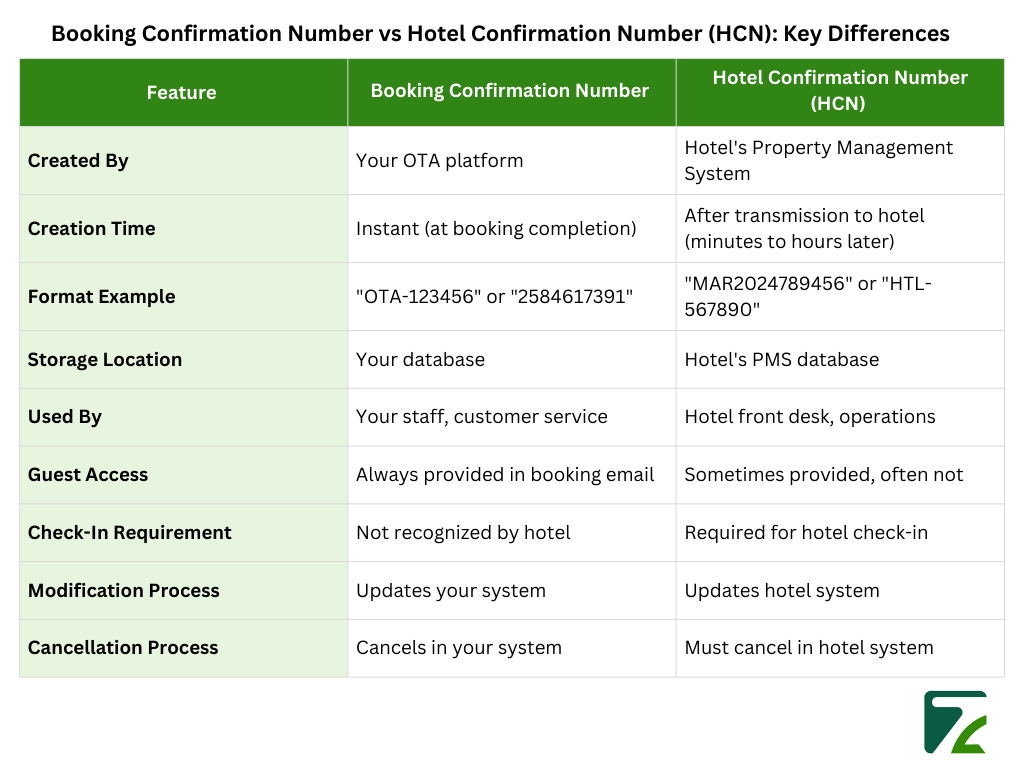
A booking confirmation number is a unique code that your OTA system generates when the customer books their stay. That number is an internal ID within your business system.
Your booking engine automatically creates this reference code when a traveler makes a room reservation on your site. The format will vary depending on your platform. Booking. com will use formats like “2584617391” and Expedia may use “12345678.” The smaller agencies often make up their own formats, such as “TRV-2024-5678.”
This number is used for only one main purpose: to monitor the transaction in the operations of your company. It also integrates with your payment gateway, attaches to the Client’s profile record, stores the commission percentage and logs all communication of the traveler.
This number is what your customer service team will key on to retrieve the reservation when travelers call. It is used by your accounting department for reconciling payments. Your operations team uses it while handling changes or cancellations.
The confirmation number of the booking exists in your own database. It is not aware of hotel room assignments, or front desk activities or housekeeping routines. It is your internal business ID period.
HCN stands for Hotel Confirmation Number. Some systems refer to it as a Property Reservation Number or Hotel Reference Booking (HRB). This is another totally separate identifier that the hotel’s PMS has generated.
Well, when your booking goes from the your system to the hotel, their PMS creates its own unique number. This occurs because hotels are running their own reservation systems which are not synced with the DB of your OTAs.
A Marriott hotel could produce “MAR2024789456.” A Holiday Inn might come up with “HI-567890.” A standalone boutique hotel that uses Cloudbeds might generate “PROP-8901234.” The syntax differs by property and PMS provider, but the concept is the same.
This is an internal tracking code for the hotel. It’s used by front desk staff for finding reservations at check-in. It is referred to by housekeeping when rooms are made up. It is what the night audit team use it for billing. These are the numbers management pulls reports from.
The HCN lives exclusively in the hotel’s system. So, when a guest approaches, (or even calls) their front desk and tells that they have a confirmation number, the operator peeks into their PMS using your HCN not your booking reference number.
Here’s where things get complicated. Your booking confirmation number and the hotel’s HCN are created by different systems at different times, and these systems don’t automatically sync.
A customer finishes booking on your platform at 2 PM. Your system generates booking confirmation number “OTA-123456” immediately and charges the credit card. You provide the customer with such a reference in a confirmation email to the customer.
You now send the booking information to your hotel via a channel manager or API. This transmission may occur immediately, or after a few hours depending on your configuration.
At 3:30 pm the hotel’s PMS receives the booking, and it creates HCN “HOTEL-789012.” That number is recorded in their system, but it does not flow back into your database automatically.
Now you have two numbers expressed in two systems. The client owns your booking reference. The hotel held their confirmation number. And unless you’ve constructed systems to gather and track both, no one has the full picture.
Your agency reserves a room in a beach resort for a family vacation. Your system reflects confirmation for booking number “AGY-45678.” The family arrives after a six-hour drive, with two young children. The hotel checks their system and there is no record of anything.
What happened? The booking flowed through to the hotel’s channel manager, but execution stopped there due to an API failure in connecting with their PMS. Your system received the success response, and your booking number was issued. But the hotel did not produce an HCN because they did not receive the booking.
Without the HCN, you have no evidence that the hotel confirmed the reservation in the first place. You’re stuck arguing about technical integration while the exhausted family needs a room immediately.
A business traveler requires an additional 2 night’s stay in the hotel. They ring your hotline with booking number “BUS-78901.” Your agent updates your system and emails the hotel: “Please, extend booking BUS-78901 by two nights,”.
The hotel replies: “We are unable to find this booking in our system. Can you give me the hotel confirmation number?
Your agent does not maintain historical records of the HCN. They spend 20 minutes mining through logs of the channel manager looking for it. By the time they find the HCN and call the hotel back, those extra nights are sold out.
Your operations team has to reconfirm 200 hotel bookings for guests checking in tomorrow. They grab an exportable list from your system with all booking confirmation numbers and start phoning properties.
Each hotel asks: “What’s your hotel confirmation number?” They’re not systematically recorded on your team. Over the next eight hours, they manually track down each of those HCNs through various channels or by calling properties multiple times or searching for reservation confirmation emails. What should be 30 minutes of automated work becomes a full workday.
According to industry data, OTA bookings experience higher cancellation rates than direct booking 42% compared to 18% in the European markets. Not all cancellations are due to confirmation problems, but aside from that, not tracking numbers leads very much to failed bookings.
Do the math for a mid-sized agency handling 500 bookings per month:
This figure only includes time spent by staff directly. It doesn’t account for lost bookings from angry customers, bad reviews that will scare off the next customer or rebooking at premium rates when an error happens at check-in.
Customer research indicates that 89% of travelers trust platforms that consistently provide hotel confirmation numbers. If travelers have check-in issues, they will criticize your agency, not the hotel.
Hotel booking reconfirmation is a preventive quality control measure that travel agencies carry out 48-72 hours prior to guest arrival. This is where your operations team calls hotels to make sure, they have the bookings on their system and that all details are correct.
This isn’t a hotel requirement. It’s your agency’s preferred option for catching problems before guests arrive.
When you make a call to reconfirm a booking, you’re confirming strong the reservation is in their PMS, that the room availability didn’t change because of overbooking, that special requests were received and have been documented, that guest names and dates precisely match up with what’s booked, and that payment details are properly laid out.
This preemptive call catches integration failures, system issues or communication breakdowns before they become check-in disasters. You can fix a booking you learn doesn’t exist when you call 48 hours before your arrival. Discovering that the guest arrives at midnight leaves you with irate customers and costly emergency options.
So, here’s the important bit with regards to confirmation numbers: when you are calling a hotel to reconfirm your booking, front desk staff rely on this HCN in their PMS system so that they can find your reservation.
If you call and say “I need to reconfirm booking AGY-45678” the hotel person literally could not look that up in their system. Their database doesn’t recognize your booking number. They need HCN.
This is where agencies without systematic HCN tracking hit a wall. Your reconfirmation team exports 200 bookings from your system based on booking numbers. They start calling hotels. All hotels require HCN. Your team doesn’t have them recorded.
Now your reconfirmation process grinds to a halt as staff hunt around checking channel manager interfaces, old email and hotel calls searching by guest name/date in the event (not so helpful if you have 3 “John Smith” guests checking into property that week)
The Schedule Professional Style OTAs operate on this schedule:
In the absence of HCNs, this timeline collapses. Day one is devoted to chasing confirmation numbers, not reconfirming bookings. Day two involves rushed calls to hotels. By the third day, people are flying in and it’s too late to fix big problems.
According to Booking. Developer documentation, property confirmation numbers should be recorded for all messages regarding hotel. The major platforms understand that HCNs are essential for operational processes like reconfirmation.
The ideal time to capture the HCN is following acceptance of booking. If you have an API connection to your Channel Manager, set it up to receive the HCN from a confirmed booking. Travelgate type systems return HCNs in their response if suppliers provide them.
If platforms are not immediately returning HCNs, then schedule automatic retrieval 4-6 hours after transmission of booking. This allows hotel systems to validate and provide you with a confirmation number.
Add a field for both numbers to your booking database. Never, ever mix them within a field and never overwrite one with the other. Create mapping tables that link your booking numbers to HCNs, with a timestamp of when each was encountered.
Highlight when HCNs are not present in bookings, so you can follow up at the next available opportunity
Establish clear rules: any booking within 48 hours of check-in that doesn’t have an HCN is escalated immediately. Have staff call properties and obtain the HCN from them, so you may update your system before the guest travels.
Customer Service personnel also need to be more aware that hotel-related issues almost always are going back to the HCN being absent. If a guest says they can’t check-in, the first thing you need to do is ensure that the HCN actually exists and has been passed on to hotel.
Ops teams calling for reconfirmation must comprehend that HCNs are not optional. They are a part of efficient hotel communication.
Establish clear rules: any booking within 48 hours of check-in that doesn’t have an HCN is escalated immediately. Have staff call properties and obtain the HCN from them, so you may update your system before the guest travels.
At scale, you can’t manually keep track of dual confirmation numbers. An agency doing 50 bookings monthly can handle manual operations. One with 500 bookings per month can’t.
Automated systems to collect HCNs by extracting them through API integration, email parsing, or web scraping. They’re out there 24/7, processing confirmation numbers in mere hours after the transmission of a booking form have been made with no human involvement.
These systems use HCNs for an automatic reconfirmation call to hotels, providing a reference number exactly as their system understands it. If there are no HCNs or reconfirmations fail, the system will alert operations teams well in advance to adjust.
The ROI is plain and simple. If the procedure is to track HCNs manually, and that takes 15 minutes per booking, for an organization processing 500 bookings each month that’s over 125 hours of staff time every month. Automation brings that down to minutes of oversight, which means more time for your team to work on other, higher value things.
The booking confirmation number and the hotel confirmation number mean different things to different systems. Your booking ID is what links this transaction to your company. The hotel confirmation number is how they can follow the reservation in their systems.
Both numbers are necessary. Both of them should be captured and monitored in a systematic way. And the two should ideally be able to work together seamlessly for your bookings to succeed.
The problem is not grasping the distinction between them. The challenge for you is constructing operational processes to handle both numbers effectively across hundreds or thousands of bookings, particularly if you have the need to proactively reconfirm the booking with hotels in advance of guest arrival.
Agencies that understand this difference generate better guest experiences, lower operating expenses, and stronger brands. Those who ignore it find themselves putting out fires, solving check-in emergencies and apologizing to angry customers all day.
The two-number system is here to stay. Hotels require their own confirmation numbers. OTAs need their booking references. Success arises from understanding this truth and creating systems to address the need.
No. Hotels cannot search for reservations using your OTA booking number. You need the Hotel Confirmation Number (HCN) that their Property Management System generates. Always provide the HCN at check-in.
The HCN is generated automatically by the hotel's PMS when your booking transmits to their system. Capture it through API integration with your channel manager, scheduled automated pulls 4-6 hours after booking, or by contacting the hotel directly to retrieve it.
Provide the Hotel Confirmation Number (HCN) instead. If you don't have it, contact your travel agency or OTA immediately. They can retrieve the HCN from their system or contact the hotel to locate your reservation using your name and arrival date.
You need the HCN for hotel check-in. Keep your booking confirmation number for contacting your travel agency or OTA about payments, modifications, or customer service issues. Both serve different purposes in different systems.
Most hotels generate the HCN within minutes to a few hours after receiving the booking transmission. Some properties may take up to 24 hours depending on their system and staff availability. Schedule automated HCN retrieval 4-6 hours after booking for best results.

Travel Automation Expert